Issue an advisory notice or recall
Trace a suspect lot to the customers who got it, approve a notice, tell the customers, record their replies and close with an effectiveness check.
An advisory notice, field correction or recall tells customers about a problem with shipped product. It applies while ISO 13485 is on. The QA manager approves and closes it. The default QA manager is Grace Ooi.
View as text
%% title: Notice status flow
flowchart LR
  A[Draft] -->|Trace shipped lots| A
  A -->|Approve notice| B[Approved]
  A -->|Confirm no customers affected| A
  B -->|Customers notified| C[Customers notified]
  C -->|Start effectiveness check| D[Effectiveness check]
  D -->|Close notice| E[Closed]
Trace a lot
Open Quality > Trace. The screen follows a lot in both directions.
Choose a Lot and read Trace forward. The chain runs Input lot, Orders, Shipments, Customers. A shipment with no lot you can trace says so. Under Backward trace, choose a Shipment: the Input lot panel below moves to that shipment's first input lot (picking an input lot yourself keeps it). The chain links the Sales order, the Supplier record and goods Receipt of each input lot, and any NCR raised against the order, its lots or their inspections, open or closed.
Check the suspect work in progress. Under the suspect range, choose Place on hold on each line until QA dispositions it. A held line shows On hold.
If product has shipped, choose Start recall or notice. The system makes a Draft notice (numbered RCL-2026-nnnn) with the customers, lots and quantities the trace found. If the lot already has a notice, you are taken to it.
Lot trace
Input lot, orders, shipments and customers.
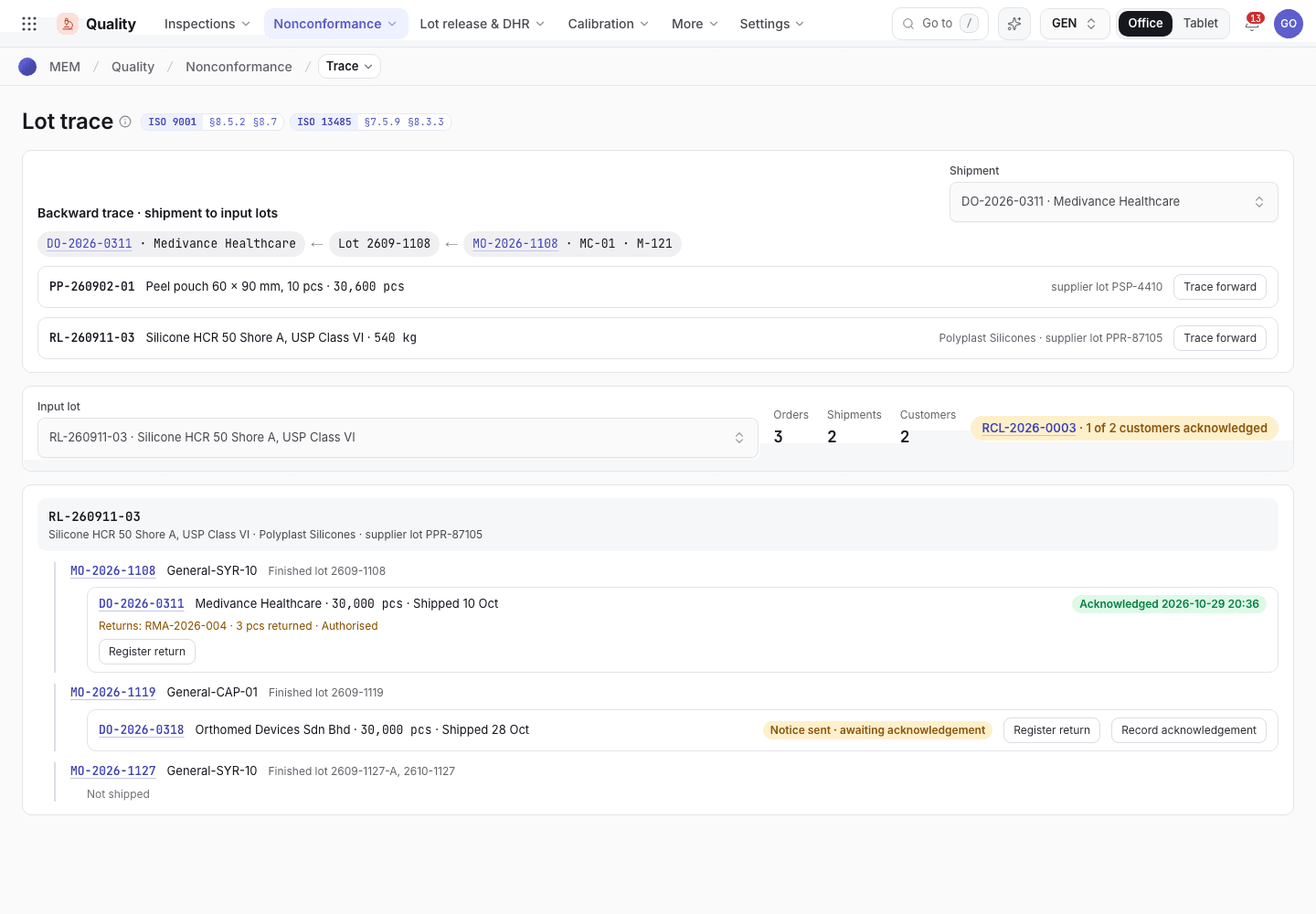
- Pick the lot and Trace forward.
- Orders, shipments and customers that received the lot.
- Start recall or notice.
Issue the notice
Open Quality > Recalls. You can also choose Add and fill in Action (Advisory notice, Field correction or Recall), Product, Lots affected and Reason.
On a Draft, enter Lots affected (separated by commas or spaces) and choose Trace shipped lots. The notice lists Customers and quantities affected.
If the trace finds no shipped delivery order, check the lot numbers. If you are sure no customer received the lots, the QA manager chooses Confirm no customers affected and signs. That is allowed only when the trace found no delivery.
Set Authority notified: Not required, Pending or Notified. Choose Approve notice and the QA manager signs. The status becomes Approved.
Send the notice to each customer. If the authority must be told, notify it and enter Authority ref.. Choose Customers notified and the QA manager signs. The status becomes Customers notified.
On Quality > Trace, choose Record acknowledgement for each delivery as the customer replies. The screen counts how many customers have acknowledged. An acknowledgement is only allowed after the customers are notified, for a delivery that has shipped and carries a lot of the notice.
Choose Start effectiveness check and sign. Write the Effectiveness check (replies received, stock returned or corrected). Choose Close notice and sign.
An advisory notice
The trace result and the next button.
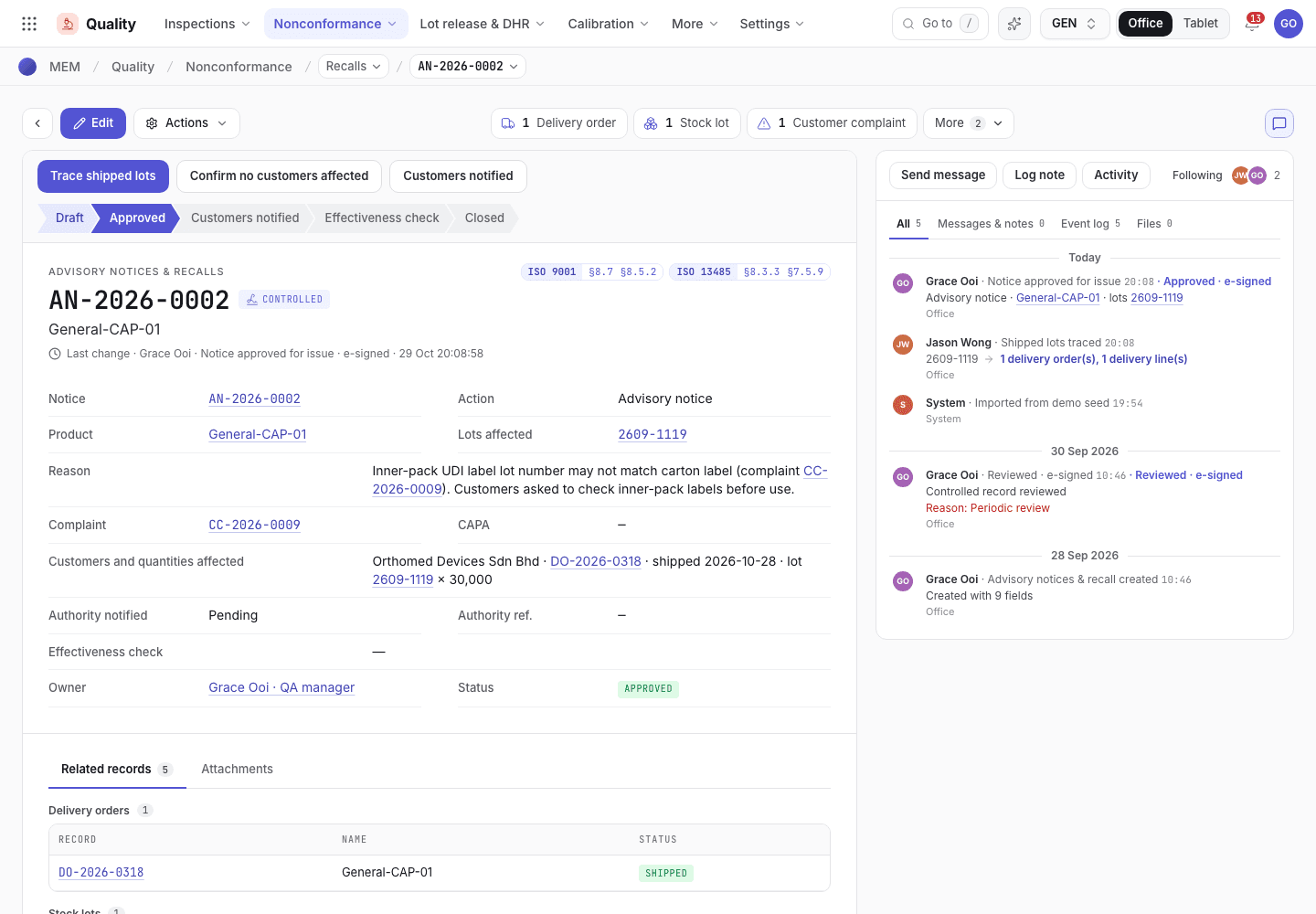
- Trace shipped lots, Confirm no customers affected and the next step.
- Customers and quantities affected.
- Authority notified and its reference.
If you change Lots affected after a trace, trace again. An approval relies on the trace of the lots now on the notice.
If the system refuses
The messages are in Complaints and recalls refusals.
Next steps
Complaints and recalls refusalsEvery message and what to do.Handle a customer complaint
Log a complaint, investigate it, decide whether it must be reported to the authority, answer the customer and close it with an NCR or CAPA.
Training records and the training gate
Set who must be trained on which document, record the training, read the matrix and see why a signed step is blocked.