Training records and the training gate
Set who must be trained on which document, record the training, read the matrix and see why a signed step is blocked.
Training decides who may take a signed step. The QA manager or HR (the organization admin) sets the requirements and records the training. Nobody records or judges their own training. The default QA manager is Grace Ooi.
View as text
%% title: How training reaches the gate
flowchart LR
  A[Requirement: role + document] --> C[Matrix status]
  B[Training record: employee + document + revision] --> C
  C -->|Current| D[Signed step allowed]
  C -->|Not trained, Retraining due, Effectiveness pending| E[Signed step blocked]
Set a training requirement
Open Quality > Requirements. A requirement links a job title to a document.
Choose Add. Pick the Role and the Document (a work instruction or a quality document).
Set Required. Before task blocks the signed steps until the person is current. Within 30 days is tracked on the matrix and does not block.
For Before task, choose the Gated task: All signed steps, Store tasks, Inspection and release, Maintenance, Nonconformance and CAPA, Change control, Purchasing or Production records. The requirement then blocks only those steps.
Status is Active. Set it to Retired when the requirement ends. A role has one live requirement for a document.
You cannot change the requirement that governs your own job title.
Record training
Open Quality > Records and choose Add.
Pick the Employee and the Document. Enter Rev trained. It must be a revision the document has had.
Enter Trained on (not a future date), the Trainer (not the employee) and the Method: On-the-job, Classroom or Read and sign.
Set Effectiveness. Pending means not yet judged. Competent or Not yet competent needs Effectiveness evidence: a sign-in sheet, test result or observation. A judged record is locked.
Training records
Every training record with its revision, method and effectiveness.
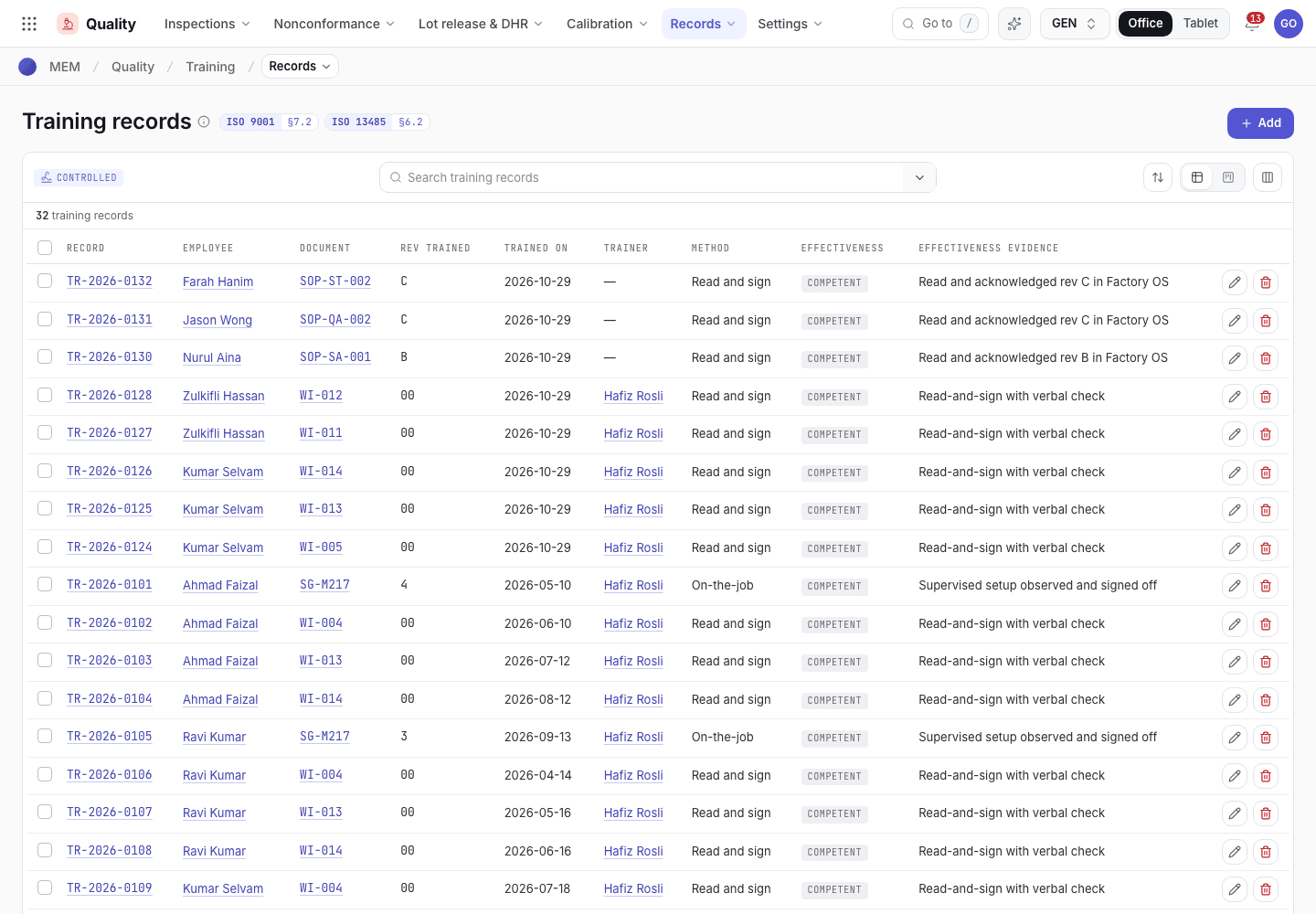
- Add a training record.
- Document and the revision trained.
- Effectiveness: Competent, Pending or Not yet competent.
Read the matrix
Open Quality > Matrix. Each row is one employee and one required document. Suspended employees are left out. The worst rows come first.
| Status | Meaning |
|---|---|
| Not trained | No record, or the last result was Not yet competent. |
| Retraining due | The document has a newer revision than Trained rev. A new revision makes earlier training due again. |
| Effectiveness pending | Trained on the current revision but not yet judged. |
| Current | Trained on the current revision and judged Competent. |
Training matrix
Each employee against the documents their role requires.
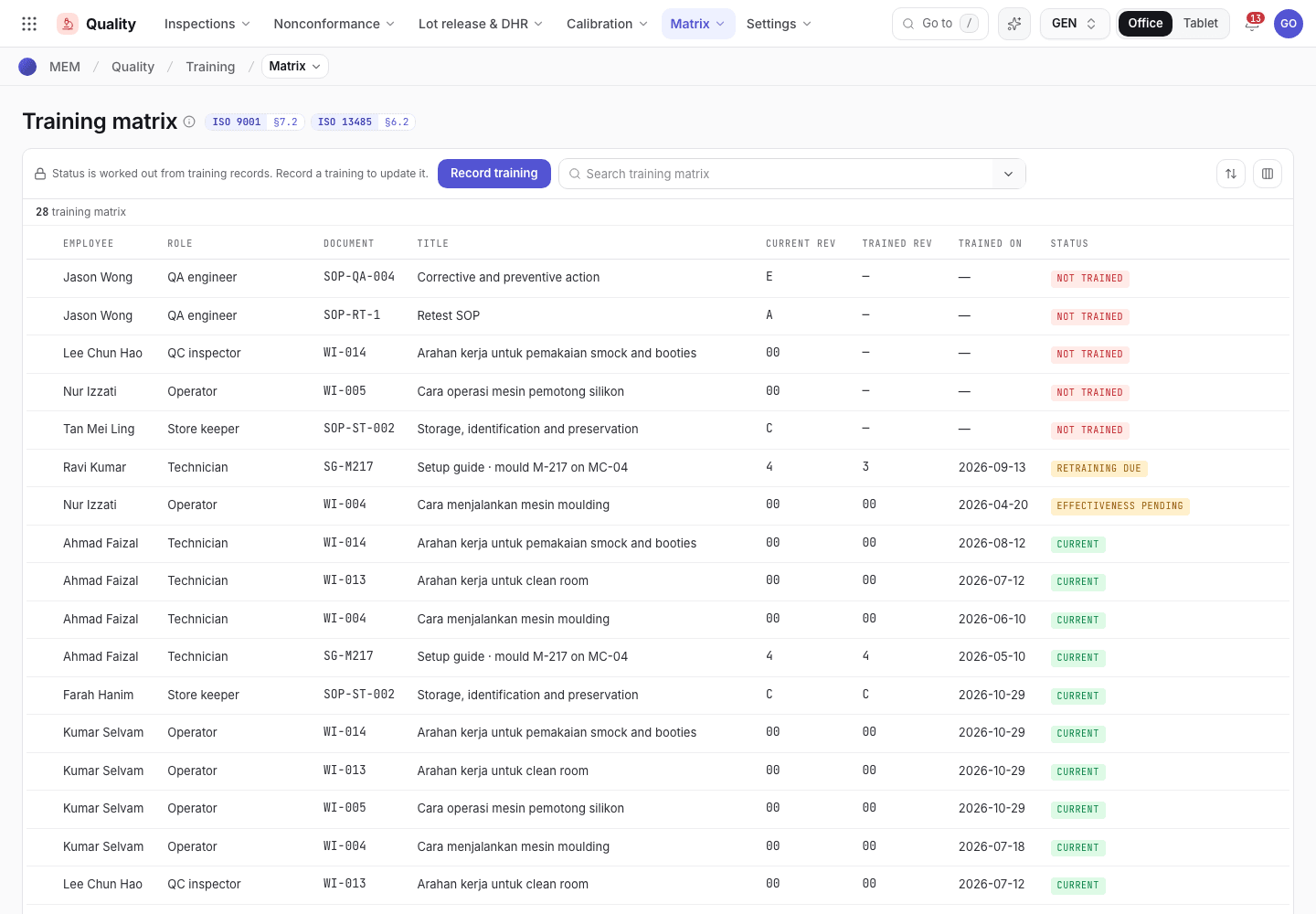
- Employee and role.
- Current rev and Trained rev.
- Status of the training.
When the gate stops you
A Before task requirement for your job title must be Current before you sign. If it is not, the
step is refused and names the document and status, for example {document} retraining due. Ask the
QA manager or HR to record your training. See Signatures and refusals.
Setting up a machine is also refused while the technician has no training record, or is not current, on the order's work instruction and the mould's setup guide. Setup asks for those two documents by name: a requirement for them does not have to exist first. A setup guide that is in neither the work instruction nor the QMS document register is not asked for.
Requirements raised by a released work instruction
When a work instruction is released, for its first release and for every new revision, the system raises a Before task requirement for each job title that uses it, unless that job title already has an active requirement for it. The Gated task is Production records. The release is the engineer's or the supervisor's step; the requirement is written by the system, not by the approver.
| Category of the work instruction | Requirement raised for |
|---|---|
| Machine setup | Technician |
| Machine operation | Operator and Technician |
| Cleanroom & hygiene | Operator and Technician |
| Utilities, Safety & environment, Security | None |
The work instruction records "Training requirements raised" with the job titles, and each new requirement records that it was added. Open Quality > Requirements to see them. The QA manager or HR can set a requirement to Retired when it ends; the next release raises one again only for a job title that has no active requirement. Training on a revision that is released later shows as Retraining due on the matrix.
Acknowledge a policy
Open Policy acknowledgements. A row for you shows Pending. Read the policy, choose Read and understood · sign and sign. The status becomes Acknowledged. Only the employee the row is for can sign it. This is how you meet a requirement for a quality document: reading and signing a document is not blocked by the training it provides.
If the system refuses
The messages are in Training and gauges refusals.
Next steps
Training and gauges refusalsEvery message and what to do.Issue an advisory notice or recall
Trace a suspect lot to the customers who got it, approve a notice, tell the customers, record their replies and close with an effectiveness check.
Gauges and calibration
Keep gauges in calibration, record and approve a calibration, assess an out-of-tolerance finding and run a gauge R&R study.