Accept your invitation
Factory OS accounts start from an invitation email. Open its link, choose a password, and you are in.
Factory OS is invite-only. Nobody can create an account on their own: the VIGOR team invites
each customer's owner, and the owner invites their team. If you have no invitation, ask your
company's Factory OS administrator for one. Opening /sign-up explains the same.
Open Accept invitation in the email. It opens accounts.<domain>/invite?id=... and shows the
workspace, your role, who invited you, and when the link expires.
Your email is already filled in from the invitation and cannot be changed. Enter your full name and a password of at least eight characters.
Choose Create account and continue. The link has already proved your email address, so no second verification email is sent. You join the workspace and Factory OS opens.
If you already have a Factory OS account with that email, the page asks for your password instead and adds you to the workspace when you choose Sign in and join.
View as text
%% title: Accept an invitation
flowchart TD
  A["Open the link in the invitation email"] --> B{"Is the invitation still open?"}
  B -- "Expired, accepted or withdrawn" --> C["Ask the person who invited you for a new one"]
  B -- "Yes" --> D{"Account with this email?"}
  D -- "No" --> E["Enter your name and a password"]
  D -- "Yes" --> F["Sign in with your password"]
  E --> G["You join the workspace and Factory OS opens"]
  F --> G
What the page shows when the link cannot be used:
| You see | What it means | What to do |
|---|---|---|
| This invitation has expired | Invitations work for 7 days. | Ask the person who invited you to send it again. |
| You have already joined | The invitation was accepted. | Sign in with the invited email. |
| This invitation is no longer valid | It was withdrawn, or the link is incomplete. | Open the newest invitation email. |
| This invitation is for another email | You are signed in with a different account. | Choose Sign out and continue. |
Set your password
The invitation page on a phone. These captures use local demonstration accounts.
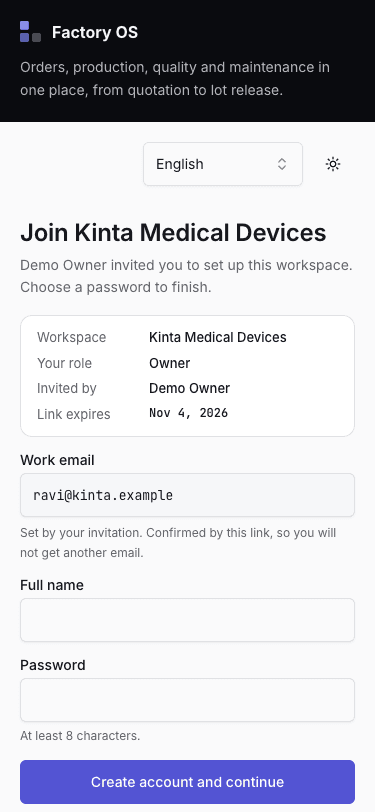
- Check the workspace, your role and who invited you.
- Your email comes from the invitation; it cannot be changed here.
- Enter your name and a password, then choose Create account and continue.