Ship part of an order or close it short
Ship an order in several deliveries, and close the balance short when the customer will not take the rest.
An order can ship in several deliveries. After the first one ships, the sales order shows Partially shipped until every piece is out. If the customer will not take the rest, Sales (Nurul Aina) closes the balance short.
View as text
%% title: Partially shipped order
flowchart LR
  A[Confirmed or In production] -->|Ship part| B[Partially shipped]
  B -->|Create delivery order · remaining qty| B
  B -->|Last delivery ships| C[Shipped]
  B -->|Close short · reason| D[Closed short]
Ship the rest of a partly shipped order
Open the order in Sales > Orders. It shows Partially shipped and the Shipped qty.
Choose Create delivery order · remaining qty and sign. The delivery order is for what is still owed (ordered less shipped), with lots chosen earliest expiry first.
Pack, dispatch and ship it as in Pick, pack and ship.
A partially shipped order
The order has shipped some pieces. The step buttons offer the rest or Close short.
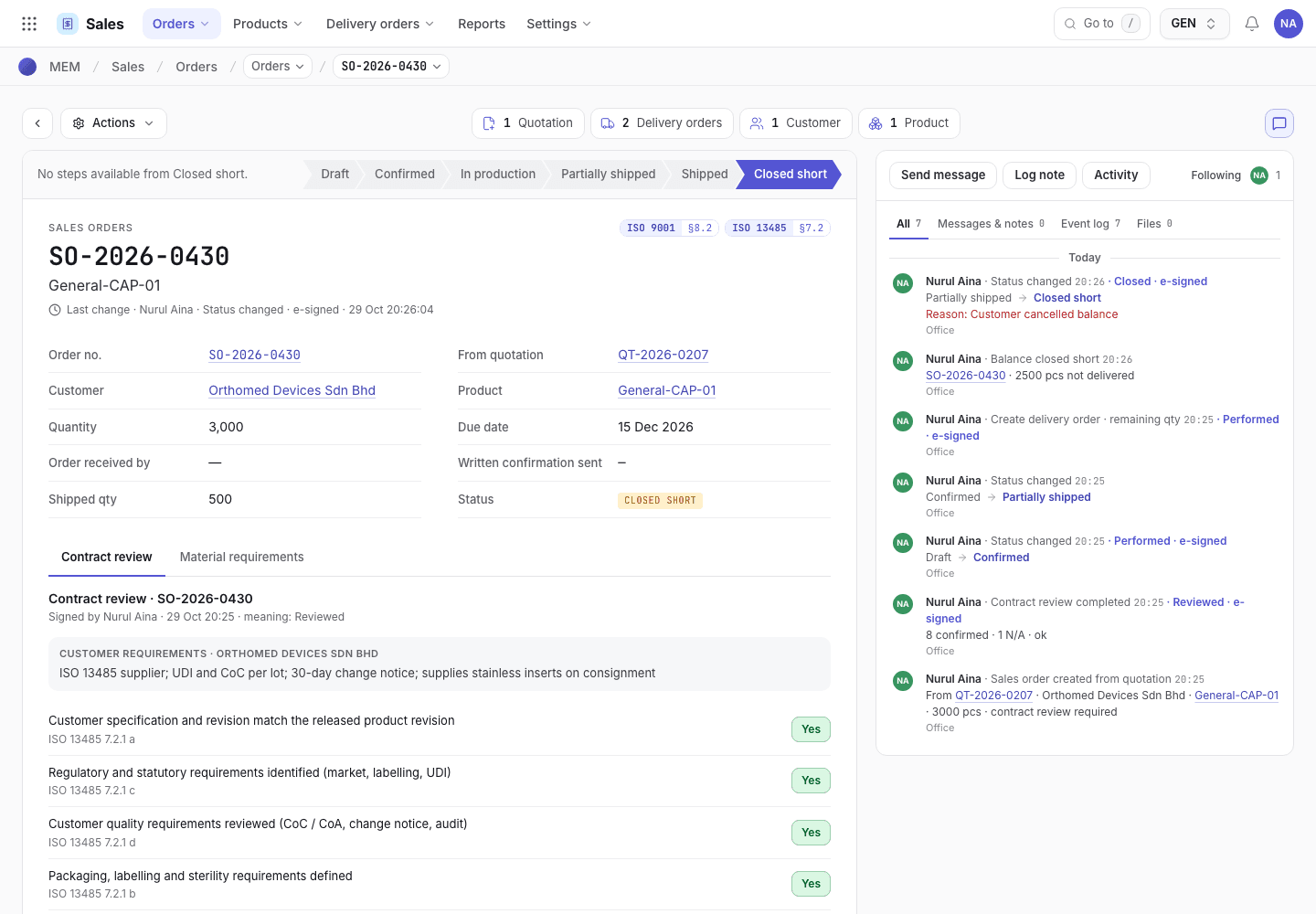
- Create delivery order · remaining qty, and Close short.
- Quantity ordered and shipped quantity.
- History: each delivery that shipped.
Ship only part of a delivery
On the packing screen you can dispatch fewer pieces than the delivery order holds. Choose the Partial
dispatch mode, build and load only the packs that leave, and Confirm dispatch. The message reads
{key} partly dispatched. When you choose Ship · issue CoC, only the dispatched pieces ship on that
delivery order. A new Picked delivery order for the balance is created, with its own lots and any packs
built but not sent.
Close short
Use Close short when the balance will never ship.
Clear anything open first: finish or cancel the manufacturing order, and ship or cancel any open delivery order for this sales order. A Picked delivery order goes Return to draft and then Cancel.
Open the order and choose Close short.
Type the reason, at least 4 characters, for example Customer cancelled the balance. Sign.
The order becomes Closed short. The history records Balance closed short with the number of pieces not
delivered.
What happens to production and planning
A Closed short, Shipped or Cancelled order is finished. You cannot create a delivery order for it, raise a purchase requisition for it, or link a new manufacturing order to it. Open manufacturing orders must be completed or cancelled before the order is closed short, because Production would keep using material for goods that can no longer ship.
If the system refuses
Every message is in Delivery refusals. The usual ones:
| Message | What to do |
|---|---|
{key} has {mo} open ({status}). The balance can be closed short once the manufacturing order is completed or cancelled. | Complete or cancel the manufacturing order. |
{key} has delivery order {do} open. ... before closing the balance short. | Ship the delivery order, or return it to draft and cancel it. |
{key} has no balance left to close. It is fully shipped. | Nothing to close. |
Close short needs a reason. Enter why. | Type at least 4 characters. |
Next steps
Sales refusalsEvery message and the fix.Pick, pack and ship
Create a delivery order from a confirmed sales order, pack and load it, confirm the dispatch, and ship it with a certificate of conformance.
Take a repeat order
Order a product you already supply, with the customer's agreed prices, and see what changes if Engineering has raised the revision.