Inspect outgoing lots and release them
Pass or hold a finished lot at outgoing inspection, keep retention samples, run the release checks and sign the lot release.
A finished lot cannot ship until two things happen. The QC inspector passes it at outgoing inspection (OQC). Then the QA manager signs the lot release. The default QC inspector is Siti Rahmah. The default QA manager is Grace Ooi.
View as text
%% title: From finished lot to shipment
flowchart LR
  A[Order at QA Final] -->|Sign · Accept lot| B[Lot waits in Q-FG-01]
  A -->|Hold lot and raise NCR| X[Lot On hold, NCR open]
  B -->|Run release checks| C{All checks passed?}
  C -->|No| D[Blocked]
  D -->|Re-run checks| C
  C -->|Yes| E[Ready]
  E -->|Sign · release lot| F[Released, lot still in Q-FG-01]
  F -->|Store posts the put-away| G[Lot in its finished goods bin]
Inspect a finished lot (OQC)
Open Quality > Outgoing. A lot appears here when the operator completes the manufacturing order. If none is waiting, the screen says so.
Read the header: product, quantity, lot size code and sample n. The sample follows general inspection level II (ISO 2859-1, normal inspection). Pull that many pieces from the lot.
Enter what you found in Critical, Major and Minor. The table shows the AQL and the Ac / Re (accept and reject numbers) for your sample size. Major is AQL 0.65 and minor is AQL 1.5. Critical is always accept 0: one critical defect fails the lot.
If the product's inspection plan has critical characteristics (CTQ), a table lists each one with its specification and gauge. Measure it on the sampled pieces and type the value. Several pieces can go in one box, separated by spaces. The verdict shows In tolerance or Out of tolerance against the plan. You cannot accept the lot until every CTQ is measured and inside the plan, and its gauge must be in calibration. If one is outside the plan, hold the lot instead.
Tick UDI labels, lot number and pouch count verified on sampled cartons. You cannot accept the lot without it.
Read Verdict. If every class shows Accept, choose Sign · Accept lot. The sign dialog repeats the sample size, the three defect counts and every CTQ reading, so you see what you are signing. Sign. The system records an outgoing inspection (for example OQ-2026-0001) with result Accepted, and the order moves to Completed. The lot stays in Q-FG-01 until the lot release.
If a class shows Reject, type the reason in the box that asks why the lot fails outgoing inspection, and choose Hold lot and raise NCR. The lot goes On hold. The system opens an NCR with source OQC and disposition Hold · 100% sort. Go to Handle nonconformances and CAPA.
Outgoing QC
With no finished lot waiting, the screen lists the recent outgoing inspections and their results. A waiting lot appears at the top with its defect table and the sign buttons.
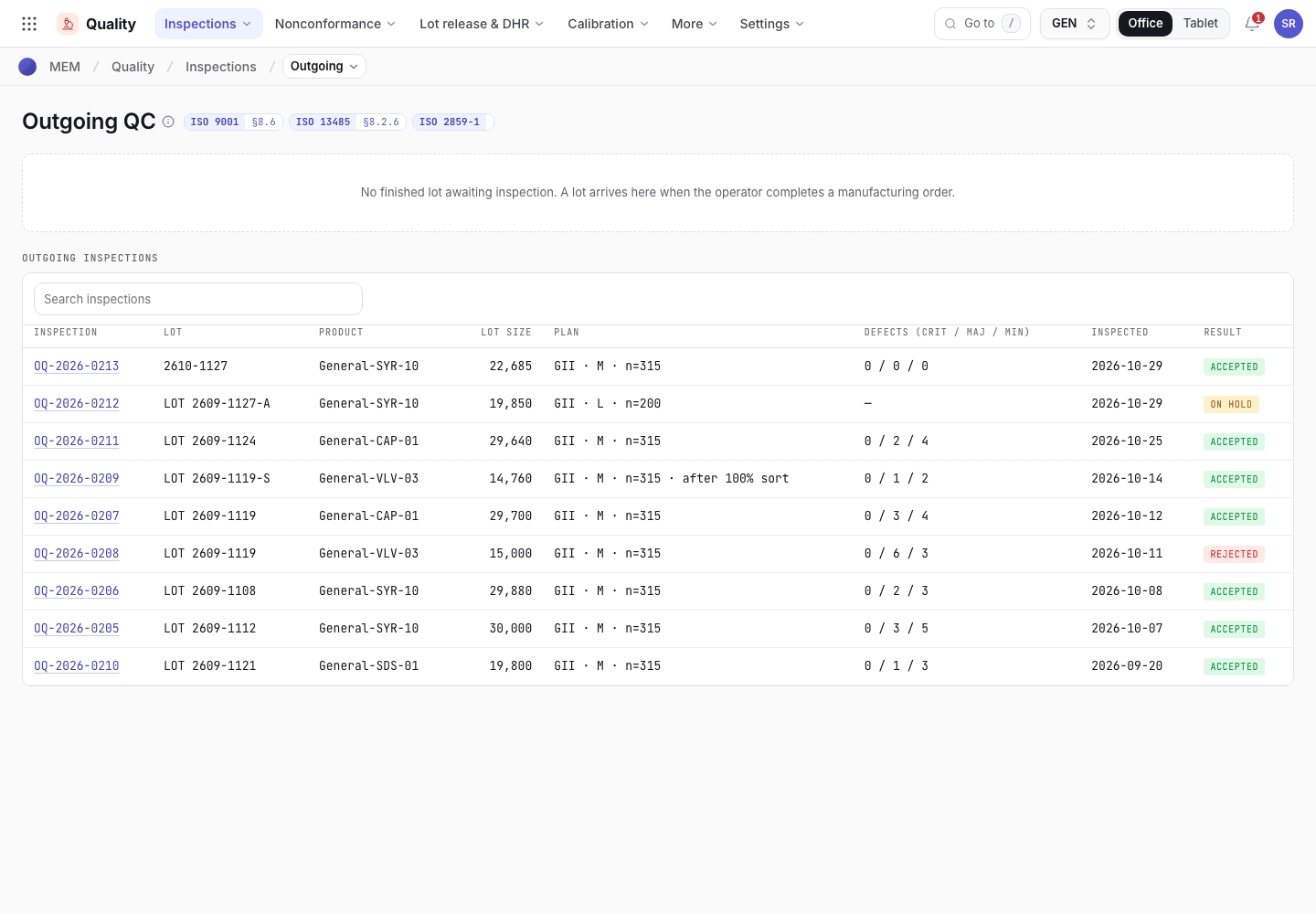
- Lots waiting for outgoing inspection appear here.
- Recent inspections: lot, product, quantity and sampling plan.
- Result: Accepted, Rejected or On hold.
Only a QC inspector (or someone signing for one) can sign an outgoing inspection, and only if their training is current. See Signatures and refusals.
Clear a hold after the NCR is closed
When the NCR of a failed lot is closed, the lot can go back to inspection.
Open Quality > Outgoing. The lot shows the hold and the NCR number. Close the NCR first, with its disposition.
A QA engineer or QA manager chooses Clear hold and signs. The lot returns to quarantine, ready to be inspected again.
A lot whose NCR was closed as Scrap cannot go back to inspection.
Keep a retention sample
Open Quality > Retention samples. This register applies while ISO 13485 is on. Each sample has the lot, quantity retained, location, Retained on and Retain until.
- Withdraw sample (Retained to Withdrawn): enter the Withdrawal reason, the Withdrawal ref. (complaint or investigation) and Qty withdrawn, then sign. The quantity is at least 1 and not more than the quantity retained.
- Dispose (to Disposed): the QA manager signs. It is allowed only on or after Retain until.
Run the release checks
Open Quality > Release checks and choose Add. Pick the Finished lot and, if you know it, the Manufacturing order. The record is numbered LRL-2026-nnn and your name is Requested by.
Choose Run release checks. The system reads the lot's records and writes the result. The status becomes Ready (All checks passed) or Blocked (N checks failed). A line starting with a cross is a blocker. A line with a tick passed.
Fix each blocker in its own record. Choose Re-run checks. Repeat until the status is Ready.
The QA manager chooses Sign · release lot and signs. The status becomes Released. The lot stays in Q-FG-01 until the store confirms where it goes: the release leaves a Draft movement of type Put-away (suggesting FG-01) in Inventory > Movements, and the store keeper is told. The store keeper opens it, changes To to the bin the lot is going into if it is not FG-01, and chooses Post movement. The lot then moves, and the delivery order can be packed from it. A lot not yet put away is refused when a pack is built.
What blocks a release
| Blocker the screen shows | How to clear it |
|---|---|
Lot is on hold, Lot is rejected or Lot is expired | Clear the hold or disposition the lot. |
No outgoing inspection record or OQC {no} is {result} | Pass the lot at outgoing inspection. |
No in-process checks for {mo} or {no} failed | Record the in-process checks of the order. A failed check blocks the release. |
Open NCR {no} | Close the NCR. |
Open first-article NCR {no} | The first article of the order was rejected and its NCR is still open. QA reviews the cause and closes it. |
Process validation {no} is {status} | The process that made the lot (product, machine, mould) has a validation that is not Validated. Complete and approve it. A lot with no validation on file shows "No process validation on file for this process" as a passed line. |
Labels not reconciled ({no} {status}) | Finish the label reconciliation of the order. |
Gauge {id} was out of calibration on {date}, the day of {record} | The gauge of a first article, first piece, in-process check or outgoing inspection of the lot was past its calibration due date on the day of the inspection. Find the effect on the product, raise an NCR if necessary, and inspect again with a calibrated gauge. The passed line Gauges in calibration when used: {ids} names the gauges that were good. |
Gauge {id} of {record} is not in the gauge register | Add the gauge in Quality > Calibration with its calibration (Gauges and calibration), or inspect again with a registered gauge. |
Gauge {id} was out of tolerance after {record} ({calibration}). Close its impact assessment first | A calibration after the inspection found the gauge out of tolerance. Write the impact assessment on that calibration record and close it. |
Validation lot: {pv} is {status}. Release it after QA approves the validation. | The lot was made by a validation run, see Validate the process. Approve the validation, then run the checks again. |
No device history record or DHR {no} not approved ({status}) | Compile and approve the DHR. See Compile and approve the DHR. ISO 13485 only. |
DHR {no} is for order {mo}, which did not produce lot {lot} | Use the DHR of the order that made the lot. |
Open disposition {no} ({status}) | Complete the material review disposition. |
A lot release check
Blocked and passed checks, and the sign button.
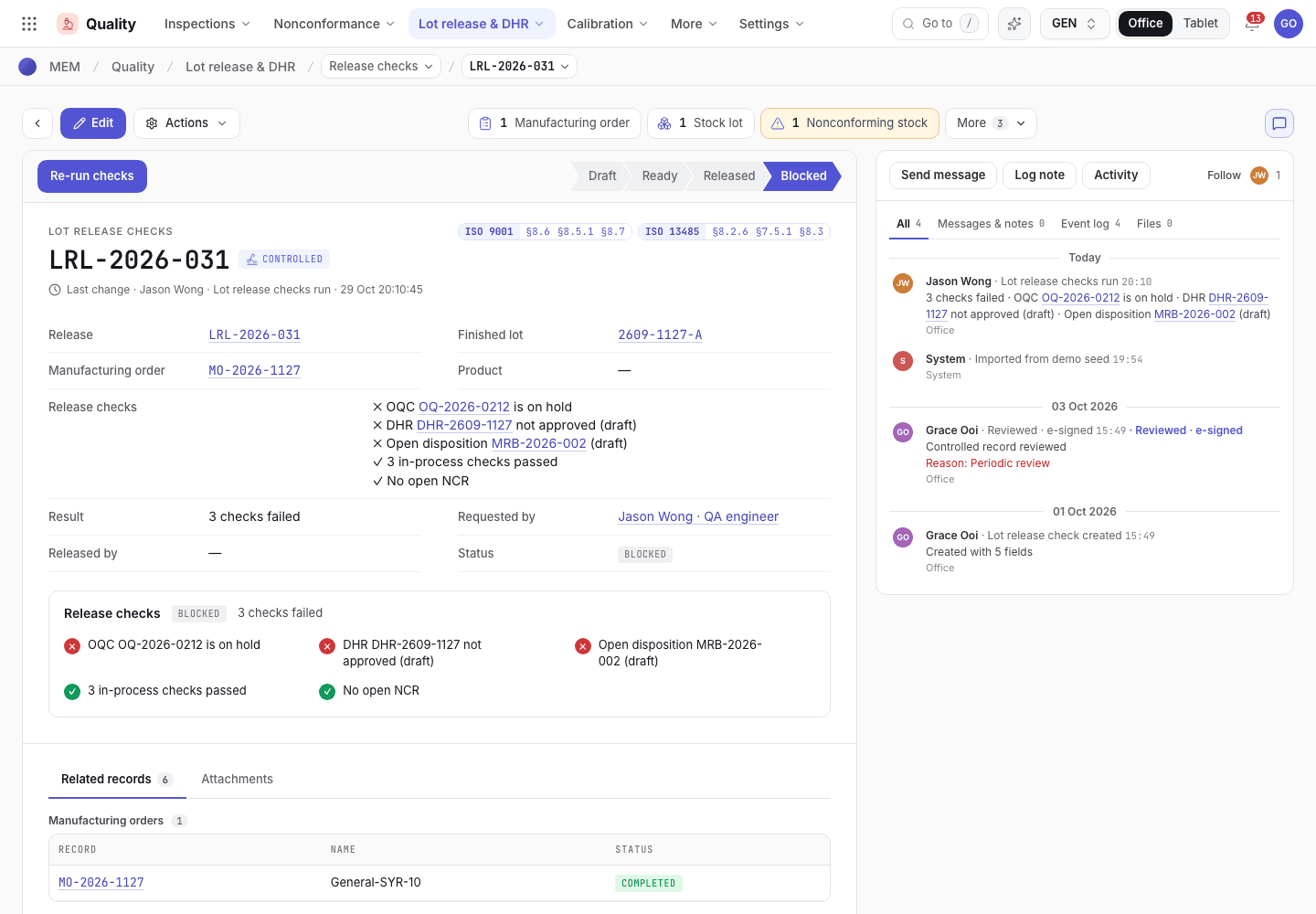
- Run release checks, Re-run checks and Sign · release lot.
- Checks that failed come first; checks that passed follow.
- Status: Ready, Blocked or Released.
If the system refuses
The messages are in Release and DHR refusals.
Next steps
Compile and approve the DHRThe record that lets a lot be released.Checks and completion refusals
Every message the system gives when it refuses a patrol check, a reject, a nonconforming stock step, a label count or the completion of a run, and what to do.
Compile and approve the DHR
Build the device history record of a finished lot from the order's records, then have a second person review and approve it.