Release the product documents
Check what must be ready, submit a product, method or work instruction for review, sign each approval level and read the revision register.
A product, a production method and a work instruction are controlled documents. Each is released only after three people have signed it, in order or, where the organization chose Parallel, in any order. Until then production cannot rely on it. The engineer (Daniel Tan) submits. The production supervisor (Hafiz Rosli) and the QA manager (Grace Ooi) sign the later levels.
View as text
%% title: Release of a controlled document
flowchart TD
  A["Draft"] -->|"Submit for review"| G{"Release gate"}
  G -->|"Something missing"| X["Refused: the message names what to fix"]
  G -->|"Ready"| B["In review"]
  B --> L1["Level 1 signs"]
  L1 --> L2["Level 2 signs"]
  L2 --> L3["Level 3 signs"]
  L3 -->|"Gate checked again"| C["Released"]
  B -->|"Return to draft"| A
  C -->|"Make obsolete"| D["Obsolete"]
What must be ready before release
The app checks the document when you choose Submit for review, and checks it again when the last level signs.
- Production method: it has at least one operation, and every operation has a station or store bin, a released work instruction, a standard time and a machine option.
- Product: its device file has a bill of materials, a released production method, a machine option, a work instruction and at least one scored PFMEA line (the refusal names the lines that are not scored). Process validation is not required to release, because a first validation needs a released product.
- Work instruction: it has at least one step.
A method that is released first lets its product be released. Release the work instruction before the method that uses it, and the method before the product.
Submit for review
Open the document (for example PROD-A, RT-SDS-02 or WI-001). Choose Submit for review. This is
a signed step.
The status becomes In review. The first level is told that it is waiting. The document is now read-only.
Submit for review
A Draft product with the Submit for review button in the workflow bar.
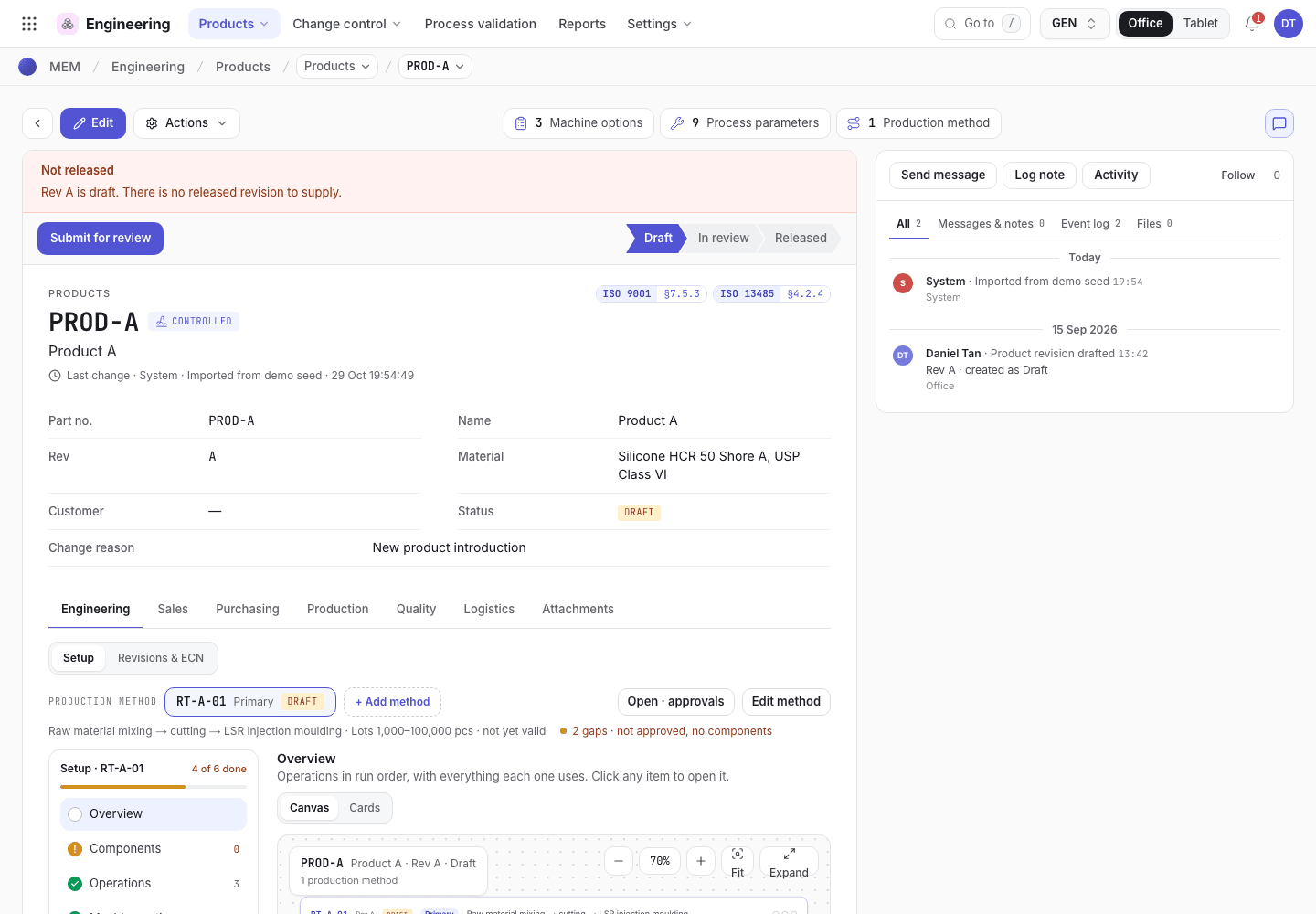
- The workflow bar: Draft, In review, Released.
- Submit for review starts the approval. It is a signed step.
- The release banner explains why the product can or cannot be supplied.
Sign the approval levels
By default a product and a production method have three levels: Engineering review (the process
engineer), Production review (the production supervisor) and QA approval (the QA manager). A work
instruction has Author review, Production review and QA approval. The organization can change
the levels, and for each family whether they sign in order or in any order, in the Engineering settings
(/engineering/cfg).
When your level is waiting, the document shows Waiting for {role} and the button is named after it, for
example Approve · Level 2 of 3 · Production review. When the levels sign in any order, the line names
every open level (Waiting for Production supervisor, QA manager) and the button is named after the level
you sign. If you do not hold the level's authority, or already signed an earlier level, the button is greyed out with the reason beneath it.
Choose the button and e-sign. You need the authority of that level, or a delegation to it.
Levels sign in order, unless the family is set to sign in any order. Then you can sign your level before the levels that come first in the list. The same person cannot sign two levels of one revision.
When the last unsigned level signs, whichever level that is, the document becomes Released and its effective date is today. The revision released before it becomes Superseded, and so do the controlled copies printed at that revision (see Controlled copies follow the release). Releasing a work instruction also raises Before task training requirements for the job titles that use it (Technician for Machine setup; Operator and Technician for Machine operation and Cleanroom & hygiene), so a technician who sets up with it needs a training record on it. See Training records and the training gate.
To send a document back, choose Return to draft. The approvals are cleared, and the history records which level asked for changes.
While a new revision is a Draft or in review
A released document keeps working while its next revision is prepared. From New revision until the last level signs, production, planning and the floor keep using the released revision, and the Draft is seen in Engineering only:
- planning: the release check, capacity and the material requirements, in planning and on a sales order;
- the manufacturing order: its method, bill of materials, machine option, parameters and work instruction, and the material issue and pick list;
- the floor: the job traveller, the tablet's work instruction steps and the first article and patrol checks;
- sales: the machine, mould and work instruction a sales order starts with.
They read the revision as it stood when the new one started: its fields (revision letter, name, cycle time) and its rows (bill of materials lines, machine options, operations, parameters, characteristics, steps). A production method also holds the lines, options, parameters and characteristics of its product that name it. An edit to the Draft does not reach production. When the last level signs, everything moves to the new revision at once. A new document that was never released has no released revision, so production does not use it.
The Revisions & approvals tab says so while the revision is a Draft or in review. A revision that was started before Factory OS kept these rows with it keeps reading its live rows until it is released.
Make a released document obsolete
The QA manager chooses Make obsolete and signs. It is refused while something still uses the document: open manufacturing orders, sales orders or quotations for a product, orders running a method, or orders, machine options, operations, machines and PM plans that name a work instruction.
Making a document obsolete also revokes every controlled copy of it.
Controlled copies follow the release
A controlled copy is valid only at the revision that is in force. The rule is the same for products, production methods, work instructions and QMS documents.
- Nothing prints from a Draft. On the print sheet, Print or save as PDF is switched off, and the
sheet says why, while the document has no released revision (
{key} has no released revision to print. Release it first.) or is obsolete ({key} is obsolete and has no released revision to print.). - A new revision waits for its release. While rev B is a Draft or In review, the copies of rev A
stay valid, and the sheet will not print rev B (
{key} rev B is being revised; print the released rev A from its revision history, or release rev B first.). - Release supersedes. When rev B is released, every Active copy printed at an earlier revision
becomes Superseded, with the date and the person who released it. Each copy and the document get an
event, for example
2 controlled copies superseded · rev B released. - Obsolete revokes. When the document is made obsolete, every Active copy becomes Revoked.
- Scanning checks the revision. A scanned copy that is not Active, or that was printed at a revision that is not in force, stops the floor with a STOP message that gives the reason. See Floor: why the app refuses.
Copies printed before this rule that are still Active are not changed afterwards. They are refused when scanned if their revision is not the one in force. Print a new copy from the released revision.
Read the revision register
Open Engineering and choose Revisions (/engineering/revreg). It lists every revision of the
products, methods, work instructions and QMS documents: Document, Type, Title, Rev,
Status, Change note, Released, Superseded, Where used and Training. Search by
document, title or change note, and filter by Status. Open a row to compare it with another revision
and see who needs retraining.
On a document, the Revisions & approvals tab shows the approval levels (Waiting or E-signed) and the Revision history: Rev, Status, Effective from, Until, Approved by and Change reason.
Revision register
Every revision with its change note, release date and where it is used.
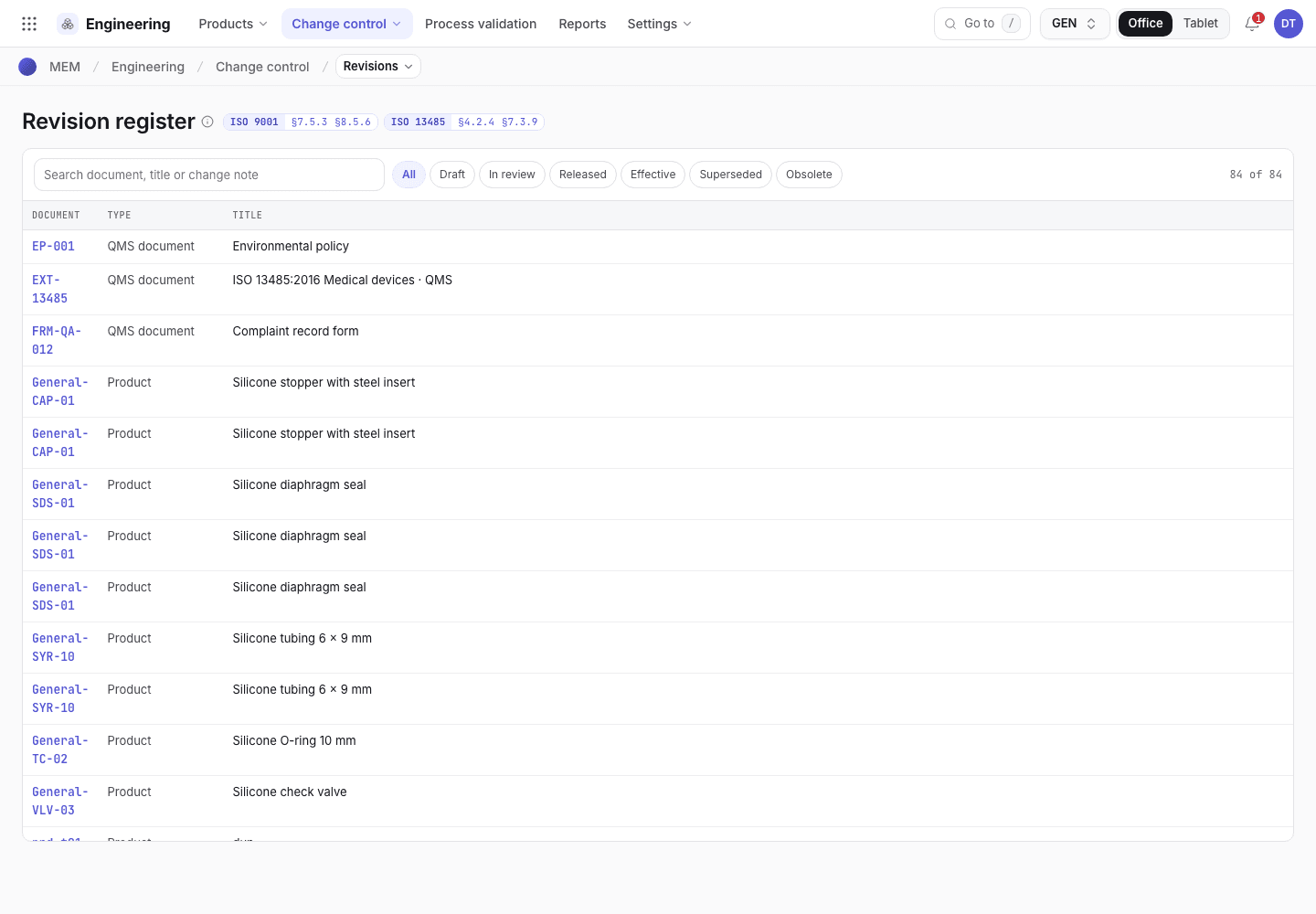
- Search the register and filter by status.
- The revision and the change note it was made under.
- Where the revision is used and who needs retraining.
QMS documents
QMS documents (procedures, policies) are released in Quality under QMS documents
(/quality/qdocs). The statuses are Draft, In review, Effective and Obsolete.
- Submit for review needs the Owner, Approver, Change description and Distribution roles.
- The named approver chooses Approve · make effective. The approver cannot be the owner, the person who submitted it, or anyone who wrote or edited the revision.
- Return to draft sends it back.
- On an Effective document: Acknowledge read (each person on the distribution), Periodic review · no change, Start revision and Make obsolete.
- Approving a revision supersedes the controlled copies printed at the previous revision, and Make obsolete revokes every copy. A QMS document prints only while it is Effective; while a new revision is a Draft or In review, the copies of the effective revision stay valid.
If the system refuses a step here, see Product development: why the app refuses.