Shifts, working hours and planned downtime
Define the shifts that run in each factory, and the holidays and maintenance windows taken out of operating hours.
Planning, due dates and acknowledgement timers count against operating hours minus planned downtime. The Org admin (Grace Ooi) and the Planner (Priya Menon) keep this up to date. Open Settings > Shifts & schedule.
Operating schedule
The 24-hour coverage bar, the shifts table and planned downtime.
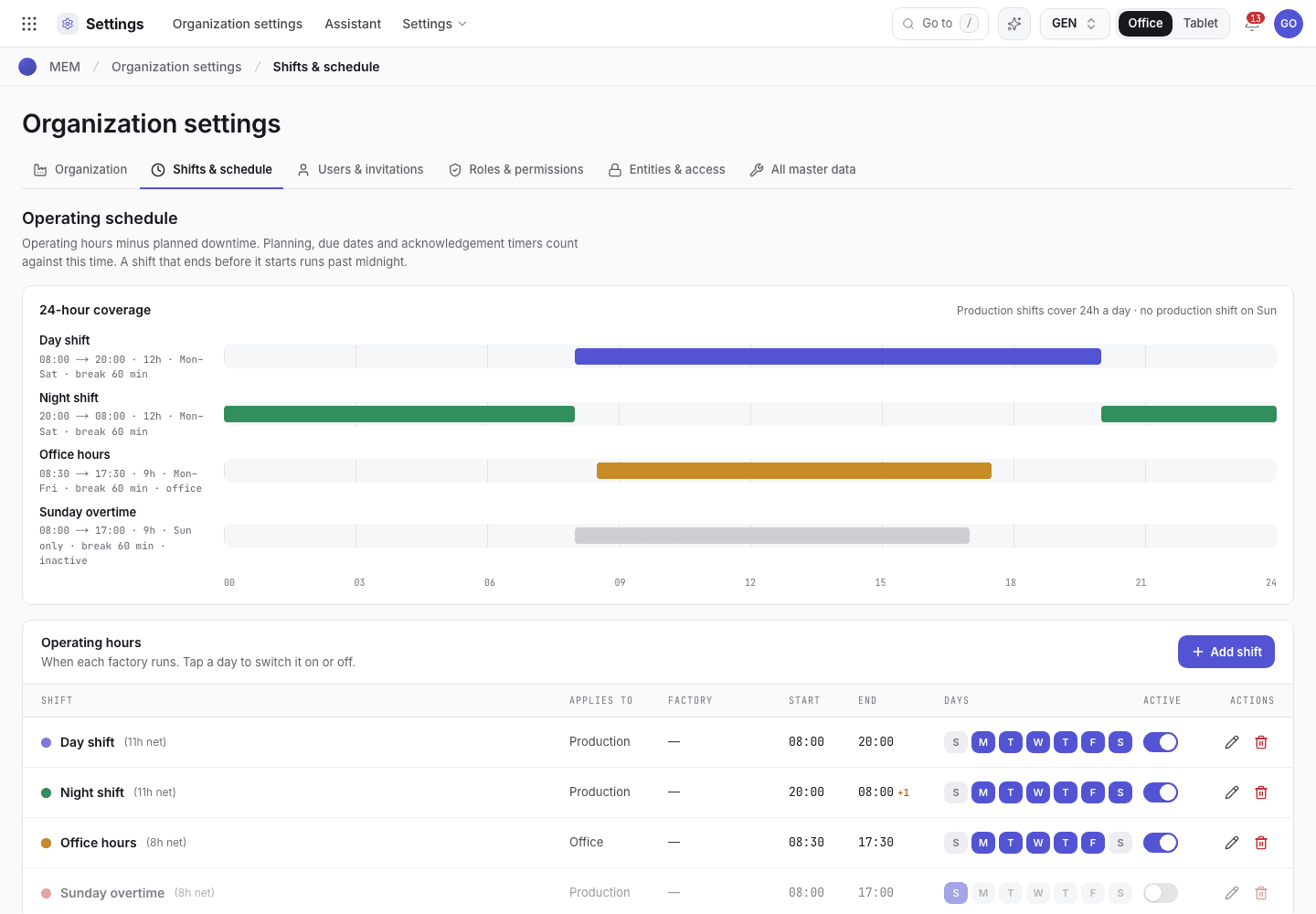
- 24-hour coverage: each shift as a bar, with a summary of hours a day.
- Add shift.
- Shifts table: shift, applies to, factory, start, end, days, active, actions.
Add or edit a shift
Choose Add shift, or Edit shift on a row.
Fill in Shift, Applies to (Production or Office), Start (HH:MM), End (HH:MM), Factory, Days and Break (min). A shift that ends before it starts runs past midnight.
Choose Sign · Save. A shift is a controlled record, so the app asks for a reason and your e-signature.
Switch days and shifts on or off
In the table, tap a day to switch it on or off, and use Activate or Deactivate for the shift. These
quick changes are logged as Shift days changed, Shift activated and Shift deactivated. A shift must
keep at least one active day.
Day presets read Mon–Fri, Mon–Sat, Every day, Sat–Sun, Sat only and Sun only. The
summary line reads Production shifts cover {hours} a day and names days with no production shift.
Planned downtime
Under Planned downtime record holidays, maintenance windows and meetings taken out of operating hours.
Each entry gets its Ref (for example PD-2026-037) when you save it. It has a Type (Holiday, Maintenance, Meeting / training), Start and
End dates, an optional Machine or Job order, and a Reason. It is a controlled record.
If the system refuses
Every message is in Settings refusals.
| Message | What to do |
|---|---|
Start must be a time like 08:00. | Enter the start as hours and minutes. |
End must be a time like 17:30. | Enter the end as hours and minutes. |
A shift must keep at least one active day. | Leave at least one day on. |
This is a controlled record. Enter the reason for the change. | Type a reason of at least 4 characters. |
Shift {name} already exists. | Choose a different shift name. |
Next steps
Organization profile and standardsOperating hours and factories.Modules and your package
See what your package includes, turn optional parts off and on, and ask Xentr to add a part.
Add people and link them to employees
Add people with a username or an email invitation, give each person tasks, link each login to one employee, and set approval limits, delegation and access expiry.