Master data
Find any reference table in one place, see which are controlled records, and know who owns each one.
Master data is the reference data used from sales through release: employees, units, locations, machine
types, work areas, reason codes and more. Settings > All master data (/config/setup) lists every table
you can read in one page. The Org admin (Grace Ooi) looks after the list. Each table is edited by the role
that owns its app.
All master data
Tables grouped by the app that owns them. Search by name, or open a group.
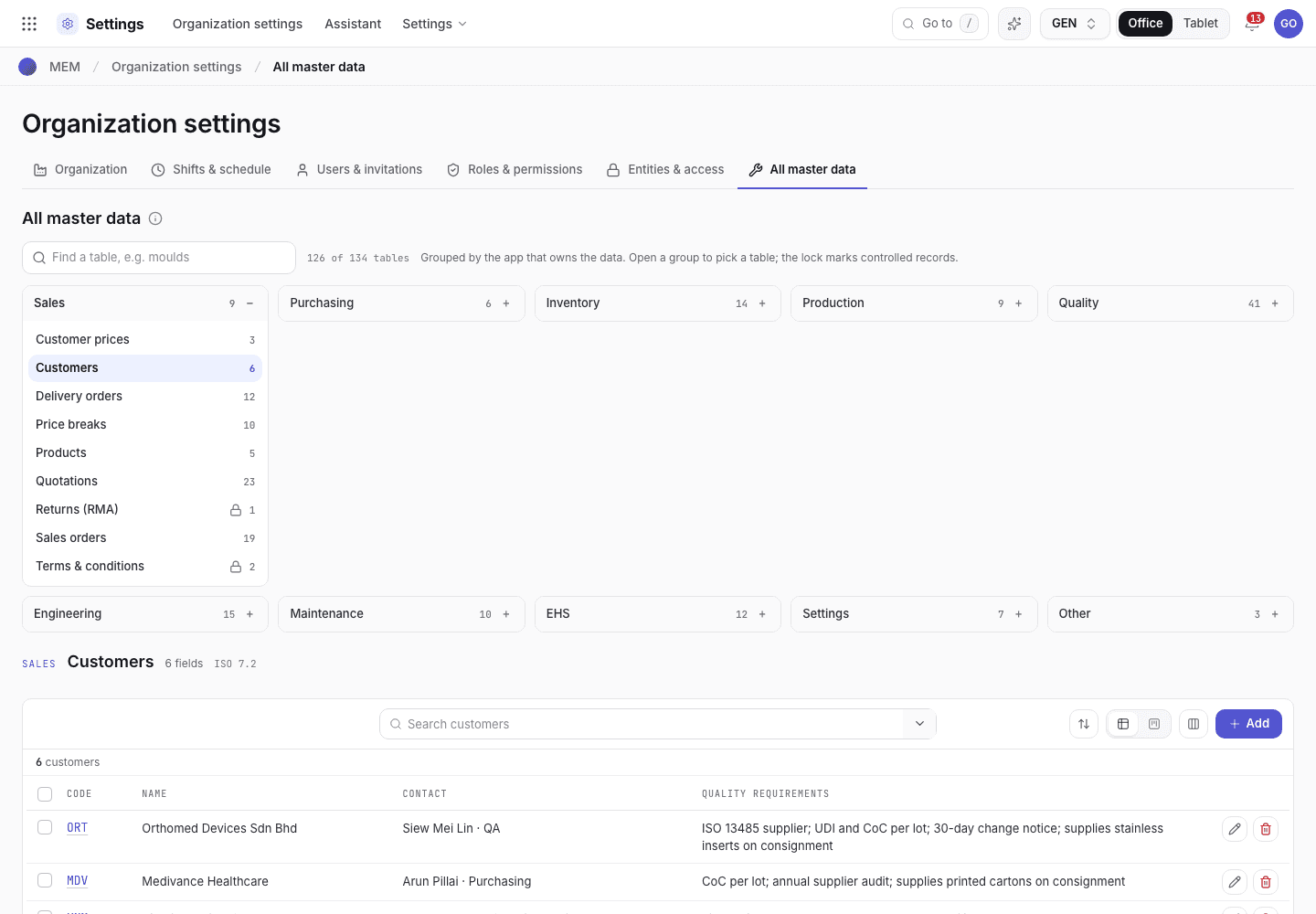
- Find a table, for example moulds.
- Groups: Sales, Purchasing, Inventory, Production, Quality, Engineering, Maintenance, EHS, Settings.
- Controlled badge, field count and ISO clauses of each table.
Find a table
Open Settings > All master data.
Type in Find a table. The count reads {n} of {total} tables. The search also matches the group name.
Choose Clear to start again.
Open a group to pick a table. A table with the Controlled badge is a controlled record.
Controlled and plain tables
A Controlled table needs a reason and an e-signature to change. Controlled documents issue a new revision on every save. A plain table can be edited with a normal form.
The tables most teams set first
| Table | Group | Where it is used |
|---|---|---|
| Employees & roles | Settings | Each login links to one employee. The role decides the screen after scanning an ID card at a machine, and which records the person may sign. Controlled. |
| Units of measure | Inventory | Item and stock units. |
| Locations | Inventory | Bins for stock, including the Quarantine location of a return. |
| Machines | Maintenance | Controlled. Production and maintenance both use them. |
| Machine types | Maintenance | The categories machines belong to. |
| Work areas | Maintenance | Where machines and permits sit. |
| Reason codes | Quality | Standard reasons for nonconforming product (ISO 13485 8.3). |
| Downtime reason codes | Production | Codes for why a machine stopped. |
| Factories and Shifts & working hours | Settings | See Organization and Shifts. |
| Terms & conditions | Sales | Reusable text on quotations and sales orders. |
You only see the tables your role can read, and only those of standards that are switched on. A table that is missing from the list may be hidden by your access letter or by a standard that the Org admin switched off. See Change what a role can see and do.
Add a record
You do not type a code. Customers, suppliers, items, products, machines, moulds, gauges, production methods, machine
options, work instructions, checklists, utilities, employees, legal entities, factories, terms, inspection
characteristics, AQL plans and IPQC frequencies get their number when you save, for example MCH-0010.
The Add form shows it as Assigned on save.
Enter the Name (or the description the table uses, such as Description of an item or Title of a work instruction).
Optionally enter an Internal reference: the code your team already uses, a customer's part number or an
asset tag, for example MC-07. Each internal reference is used once in a table. Leave it blank if you have none.
Choose Save. Pickers then show the record as Name · Internal reference, with its number underneath, and you can search by any of the three.
A machine option has no name of its own: it is shown by its machine, mould and operation, for example
MC-03 · M-217 · OP 10.
You can change the name and the internal reference later. The number stays. Records made before numbering keep their code as their number.
Change a record
Open the table, then the record. Controlled records ask for a reason and your signature. A record that other records point to cannot be deleted. The message names the records that use it. See Signatures and refusals.
If the system refuses
Every message is in Settings refusals.
| Message | What to do |
|---|---|
You cannot change your own role, department or status. Ask another administrator. | Another administrator edits your employee record. |
This is a controlled record. Enter the reason for the change. | Type a reason. |
{key} is used by {records}. Remove those first. | Change the records that use it, then delete. |
{field} {ref} is already used by {key}. | Use another reference, or open that record. |