Set up and request the first piece
Pick up a job on the machine tablet, scan the machine, set up, and hand the first piece to QC.
The machine tablet takes a technician from a new job to an accepted first piece. Open /floor on the
tablet, or Home and the shop floor app. The default roles are Technician (Ahmad Faizal) and QC
inspector (Siti Rahmah).
View as text
%% title: Tablet phases
flowchart LR
  A[Acknowledge] --> B[Scan machine]
  B --> C[Setup]
  C --> D[Inspection]
  D -->|QC accepts| E[Run]
  D -->|QC rejects| C
The page shows seven phases: Acknowledge, Scan machine, Setup, Inspection, Run, Outgoing QC and Done. The title Jobs on this tablet lists every order released to the floor. Roles without floor access see "View only. The machine tablet is worked by the floor roles; you can follow the jobs here."
Take the job and start setup
Open the job, for example MO-2026-1131. It reads "New job released to {machine}". Choose
Acknowledge job. The pick-up time is recorded against your name.
Go to the machine. Under "Scan the machine QR code on {machine}", scan the label in Machine QR code,
or type it (the format is General|MC|MC-02) and choose Scan machine QR. Use the camera reads
the QR with the tablet camera.
The system checks that you are at the order's machine, that you have a training record on the order's work instruction and the mould's setup guide and are current on both (see below), that the mould is validated, that the line is cleared, and that the machine is free and not held by maintenance, and that the machine has no open alarm stop still waiting for its downtime reason. The setup timer starts and the order becomes Setup.
Jobs on the machine tablet
The job picker, then a job waiting to be acknowledged.
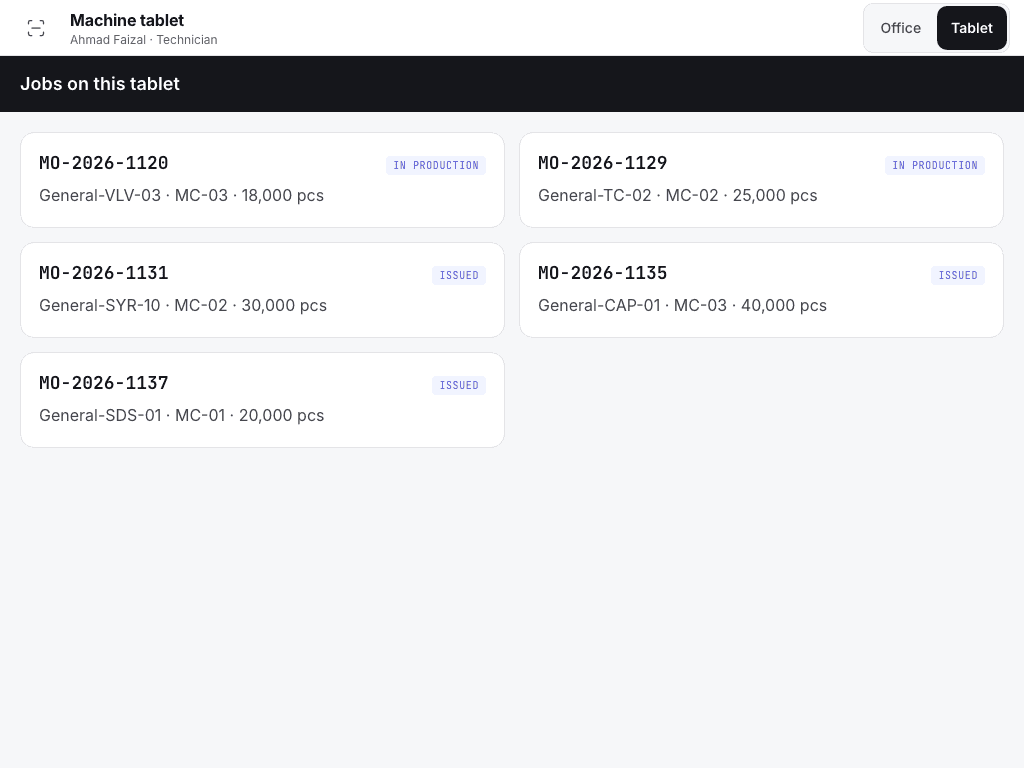
- Jobs on this tablet.
- Each job with machine, product and status.
- Back to apps.
Scan the machine
A job before setup: acknowledge, then scan the machine QR.
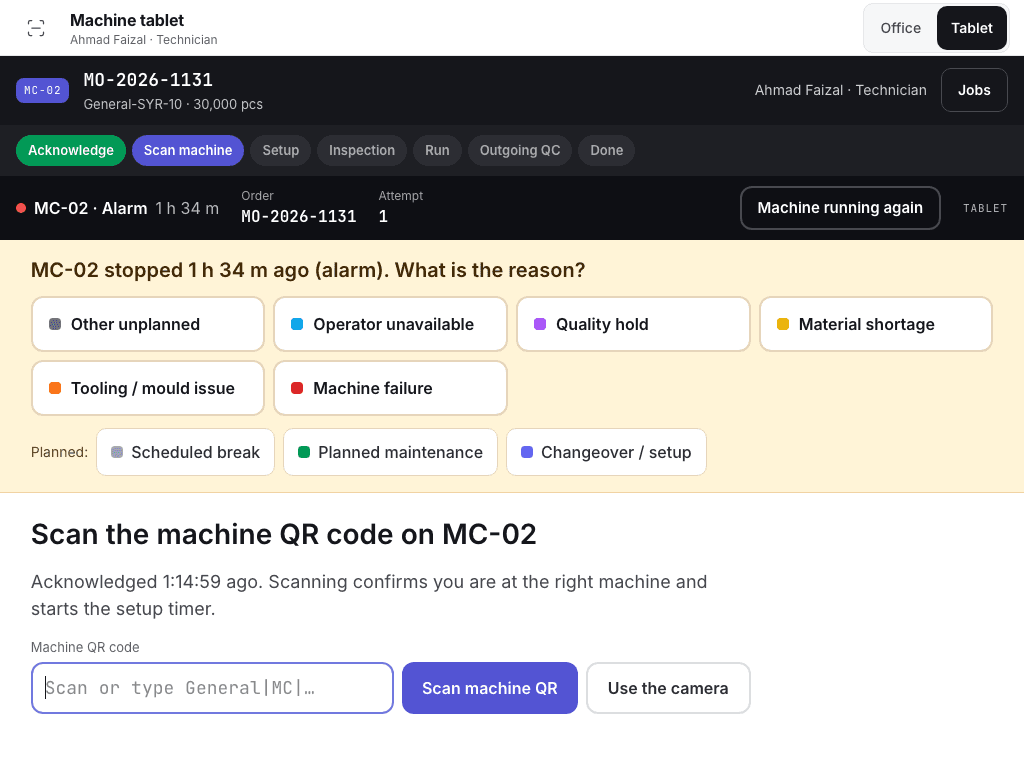
- The seven phases.
- Acknowledge job, or the machine QR field.
- Scan machine QR or Use the camera.
Do the setup
The title reads "Setup · {work instruction}" with the attempt number and "{n} of {of} steps confirmed".
Under Scan setup resources, verify the Mould, the Material lot and the Gauge. Each row says "Expected: ..." for what this order needs. Scan or type the ID in Scan or type ID and choose Check. The row shows "{n} of {of} verified". The Gauge row expects a gauge named in the product's inspection plan: a calibrated gauge that is not one of them is refused with the plan's gauges listed. The Material lot must be a lot that the store issued to this order: until the store issues the material, every lot is refused, so the finished lot always traces to its material.
Work down the work instruction steps. For a tick step choose Mark done. For a scan step scan the label or type its code in Code for this step, then choose Scan: the code is checked against what the step names (the lot of the material, or the mould it loads). For a Reading step enter the value. It counts only inside the shown Range. A step done shows "✓ Done".
When every resource is verified and every step is confirmed, choose Setup done · request inspection. The order becomes QA Check. The machine stays on hold until QC accepts.
Hand the first piece to QC
QC inspects a first piece (FPI, critical characteristics only) or, when a trigger applies, a first article (FAI, every characteristic and the document checks). The tablet says which one and why.
Hand the first parts to QC. The tablet shows "Waiting for QC · {QC order}".
At the machine, QC chooses QC · scan machine and acknowledge. Remote acknowledgement does not count as attendance. Only QC and QA can do this.
QC chooses QC · inspect and accept. In the dialog QC enters every reading and checks the Gauge used, which starts as the gauge the inspection plan names for the characteristic. When the plan uses more than one gauge, each reading has its own gauge field. QC chooses Accept · e-sign. The order becomes In Production. A reading measured with a different gauge than its characteristic's planned one is refused, so the first article is never accepted on the wrong instrument. The first article report shows the gauge of every reading.
If a reading is out of tolerance, QC chooses QC · reject, writes the reason and the recalibration needed, and chooses Reject · send to re-setup. An NCR is raised and the job returns to the technician as a new attempt. The setup screen reads "Re-setup after rejection: {reason}". When a later attempt is accepted, the NCR stays open for its owner, the QA engineer. The re-accept is noted on it ("First article re-accepted"). QA judges the cause, adds the corrective action and closes the NCR. Until then the NCR also blocks the lot release.
Each try is an attempt. The list Setup and first-article attempts on Production > Orders shows the technician, pick-up, acknowledgement, setup, QC and result times, and the First-pass FAI rate.
Training needed to set up
Setting up needs a training record on the order's work instruction and on the setup guide of the mould
(for mould M-217, SG-M217). The QA manager does not have to list them as a requirement first: the
two documents are asked for by name, so with no record at all you are refused, with a record on an older
revision you are asked to retrain, and with training whose effectiveness is not yet checked you wait for
the check. Ask the QA manager or HR to record your training on the document the message names. See
Training records and the training gate. A setup guide that is not in the
document registers is not asked for.
If the system refuses
Messages shared by every flow are in Signatures and refusals. Setup messages are in Machine floor refusals. Examples:
STOP · Wrong machine. Scanned {scanned}; this order runs on {machine}. No setup has started.Setup refused: {name} is not trained on {document} (required for {role}). See Quality · Training.Scan and verify the mould, material lot and gauge firstQC must acknowledge at the machine first