Roles at a glance
The twelve app roles, what each can open and change, who works on the floor, and who signs what.
Every person in Factory OS has two kinds of role. They are easy to mix up, so keep them apart.
- Workspace role: owner, admin or member. It controls the workspace itself: inviting people, renaming it, transferring ownership. See Workspace owner and admin.
- App role: one of twelve. It controls which factory modules you can open, which you can change, and your menus. This page and the role pages below describe the app roles.
Separately, each person is linked to a person (for example Production supervisor or QA manager) and an employee. The person decides which signed steps you can take. The employee decides which training you must have.
The twelve app roles
| Role | Demo person | Page |
|---|---|---|
| Org admin | Grace Ooi, QA manager | Org admin |
| Managing director | Lee Chong Ming | Managing director |
| Sales / office | Nurul Aina | Sales |
| Purchasing | Lim Wei Jie | Purchasing |
| Store | Farah Hanim | Store |
| Planner | Priya Menon, planner. Hafiz Rosli, supervisor. | Planner |
| Technician | Ahmad Faizal, technician. Kumar Selvam, operator. | Technician |
| QC inspector | Siti Rahmah | QC inspector |
| QA / regulatory | Jason Wong, QA engineer | QA and regulatory |
| Engineering | Daniel Tan | Engineering |
| Maintenance | Zulkifli Hassan | Maintenance |
| EHS officer | Nurul Aini | EHS officer |
Access matrix
Full means you can create, edit and take steps. View means you can read but not change. None hides the module: it does not appear. These are the defaults. The Org admin can change them for the whole organization under Settings > Roles & permissions, so your organization may differ.
Roles and permissions
One row per role, one column per module. Only the Org admin sees this screen.
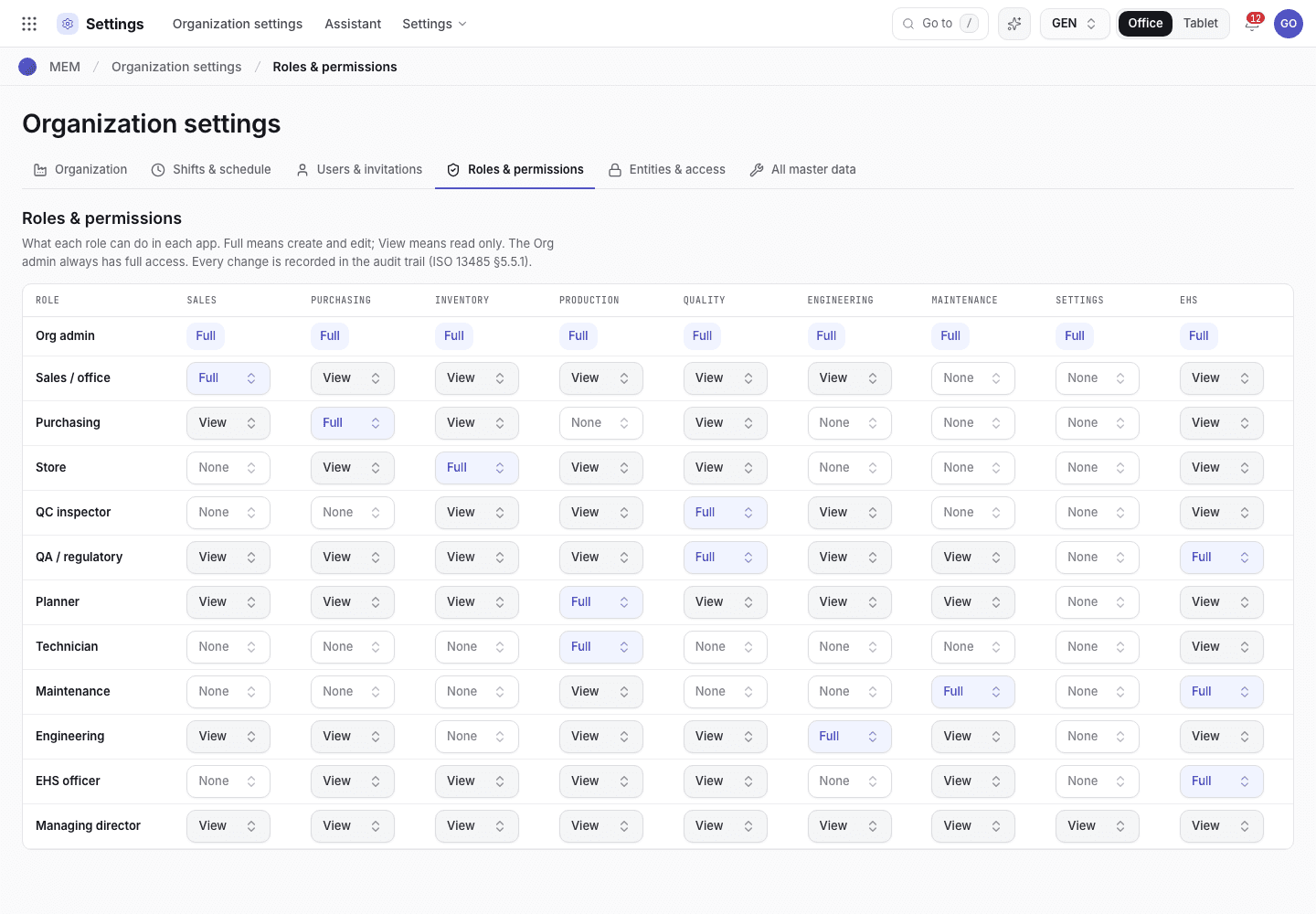
- One row per role. The Org admin row is locked to Full.
- Each cell sets Full, View or None for that role and module.
| Role | Sales | Purchasing | Inventory | Production | Quality | Engineering | Maintenance | Settings | EHS |
|---|---|---|---|---|---|---|---|---|---|
| Org admin | Full | Full | Full | Full | Full | Full | Full | Full | Full |
| Managing director | View | View | View | View | View | View | View | View | View |
| Sales / office | Full | View | View | View | View | View | None | None | View |
| Purchasing | View | Full | View | None | View | None | None | None | View |
| Store | None | View | Full | View | View | None | None | None | View |
| Planner | View | View | View | Full | View | View | View | None | View |
| Technician | None | None | None | Full | None | None | None | None | View |
| QC inspector | None | None | View | View | Full | View | None | None | View |
| QA / regulatory | View | View | View | View | Full | View | View | None | Full |
| Engineering | View | View | View | View | View | Full | View | None | View |
| Maintenance | None | None | View | View | None | View | Full | None | Full |
| EHS officer | None | View | View | View | View | None | View | None | Full |
Notes on the matrix:
- Home, the apps launcher and My settings are open to everyone.
- The Org admin row is locked at Full. It cannot be lowered.
- Engineering has View on Purchasing so the engineer who signs project orders and progress claims can open the order.
- Store has None on Sales but sees one Sales page, Packing & dispatch. The store keeper builds and loads the packs there. Sales confirms the dispatch.
- Except for that page, a role never sees a module set to None, and an ISO standard that is switched off hides its records for everyone.
Who works on the floor
The machine tablet (Floor) and phone scan open for these roles: Org admin, Technician, QC inspector, QA / regulatory, Planner, Maintenance, Store and Engineering. Managing director, Sales, Purchasing and EHS officer work in the office screens only.
Who signs what
Access lets you open a step. Signing authority lets you complete a signed one. See Signatures, reasons and common refusals for the rules.
| Person | Signs by default |
|---|---|
| Purchasing officer | Purchase requisitions: Approve · e-sign. Supplier corrective actions and evaluations. |
| QA manager | Engineering change notes, QMS objectives, documents and changes, management reviews, internal audit programme, trend reviews, recalls, record disposal, software validation, device history records, lot release, complaints, training records. |
| QA engineer | CAPA, audit findings, gauges and calibration, process validation, nonconformance reports. Also any step that needs a QC inspector. |
| QC inspector | Incoming, in-process and outgoing inspection records, QC orders, retention samples. |
| Production supervisor | Line clearance, label reconciliation, paper transcription, the machine register. The planner may sign the supervisor steps too. |
| Store keeper | Stock counts, movements, nonconforming stock, housekeeping, storage environment. |
| Process engineer | Production methods, process FMEA, bill of materials, process steps, moulds and device files. |
| EHS officer | Environmental and safety records. |
| Managing director | Management system scope and appointments. |
A QA manager can sign anything a QA engineer or QC inspector can. A QA engineer can sign anything a QC inspector can. The Org admin has no extra standing: Grace Ooi signs as the QA manager because her person is the QA manager, not because she is Org admin.
Change who can open what
Only the Org admin changes the matrix. See Roles and permissions. Changing a person's signing authority means linking them to a different person in Settings > Users & invitations, or giving them a delegation window in Settings > Entities & access.